In this post, I want to discuss scannable technology in the classroom. Scannable technology can be anything from QR codes to augmented reality. Let’s talk about QR codes first.
QR Codes
QR code for PBS Kids
QR codes are images that are linked to different resources such as websites, PDFs, images, and videos. The QR codes are made up of black and white squares and can be scanned with a QR code scanner. This can be downloaded onto an iPad or iPhone or any other sort of device. This QR code inserted into the post is the QR code I made; it is linked to PBS kids. I have created several others which I will post down below, but my idea with the QR codes was to have a few options for students to do in their free time. I have a few story books and some math games as well.
Cool Math 4 Kids
Just Books Read Aloud
Story Time with Ms.Becky channel
QR codes are a great way to make sure students get to the resources they need. This helps save time and alleviate frustration in the classroom. QR codes are super easy to generate. Simply go to a QR code generator and link the resources to the QR code. These four I created as a free time activity, but you could also link QR codes to provide resources to students in a science, math, or language lesson. QR codes are very easy for students, even as young as kindergarten to start. Another great thing is you can see how many times a QR codes is scanned.
Augmented Reality
Augmented reality is a fun way to bring learning to life. Teachers can download augmented reality onto any device that can store and use apps. Below, I demonstrate how I would use augmented reality, or AR, in my classroom.
Many educators have a desire to start coding, however, it is complicated. Coding is like learning a new language, math equation, and science all in one. It can present frustration and a challenge that not many people are willing to face. However, let’s break down those fears and misconceptions.
Let’s talk about the benefits of coding. Last post, the triple E framework was discussed- engage, enhance, and extend. Well, coding compliments the triple E framework like peanut butter compliments jelly. When you code, you take a learner from being passive to an active learner. The learner is learning hands on. They can collaborate in groups. And they can have fun doing it. With coding, students can be entertained and learned at the same time.
Coding can enhance learning. Coding, in itself, is a scaffolding process. When you code, you build of what you learn. It is similar to learning a language. You start with the basics, but gradually you take what you learn from the basics and apply them to more advanced skills.
Coding teaches skills like perseverance, determination, problem solving, and other skills sets that are valuable not only in school but in life. This extends the learning. Coding allows students to enhance skills they may not otherwise learn. Yes, it is challenging, Yes, it is frustrating, But the benefits that come out of learning this skills outweigh the frustration and brain-aches you might feel.
In the text, “No Fear Coding’, by Heidi Williams, it discuss the idea of computational learning. Computational thinking is the problem solving process, but it also combines project-based and inquiry- based learning- both of which are important to students. Williams also discusses how coding can allow students to see their thinking within the code itself, and how it takes an abstract concept and makes it more realistic and feasible. Coding also can help create a creative environment for students by allowing them to design and make their own codes.
An easy way to have you, the teacher, and your students get started with coding is through a program called Scratch. It was created through MIT and is user friendly for those of us that are not coding masters.
I did some coding on Scratch, a coding program designed for beginners, and I personally thought it was fun, simple to use, not frustrating, and educational.
This week I want to focus on the idea that technology is a ‘distraction’. And the thing is, technology does not have to be a distraction. A lot of times, I have seen teachers used technology as a filler or as a reward. I have seen teachers fail to explicitly show and instruct students how to use the technology as a tool. So this post is to help and educate teachers and instructors on how to make technology the tool and not the focus. Or in other words, technology should be the potatoes, not the meat.
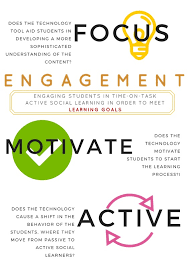
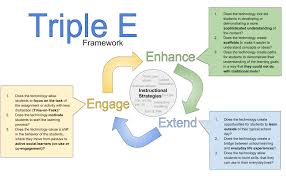
So, where does one start? Well, I have found the 3 E’s framework to provide a very straightforward recipe to success in technology use and instructor. The first E is Engagement. In previous posts, I have talked about how it is imperative that students actively learn and are motivated in their learning. In order for this to be the outcome, instructors must do a few things to guide students on the right path. First, explicit instruction must be provided. The teacher or instructor must say and show exactly how to use the piece of technology and how to use it with the specific activity. Then comes guided practice. The instruction should take the steps “I do, we do, you do”. After that, the teacher should monitoring the use of technology in the classroom to ensure students are using it correctly.
The next E is Enhancement. Enhancement in this case is the process of supporting our learning and scaffolding the material. Scaffolding the process of using what students already know to make connections with new information. When students make connections between new information and information they already know and understand, they are more likely to remember it.
The last E is Extension. Extension refers to bridging the gap between real life and classroom activities and learning. It is important that students see the ‘point’ of learning the material. If students fail to see that, it is a lot harder for them to stay motivated and to want to learn.
The three E’s model can really help you build success as you teach technology and use it as a tool to encourage a new generation and way of learning in your classroom. Technology is a great tool to further learning and expand a student’s mind. Technology can help students see beyond the classroom.
Many educators, parents, adults, and students may be wondering what is this, why are we doing this, and how do we even start. This post’s purpose is to help you solve all of your burning questions. Let’s begin with the what.
What Is Technology in the Classroom?
Technology in the classroom is an aide. It is there to assist in learning and make it more purposeful. Maybe you remember a time where you sat in class and the teacher lectured the whole time. Maybe you found school to be boring or uninteresting. Maybe you have a hard time even remembering what you learned in school. All those statements are reasons to start on this journey to using technology in the classroom. The purpose of technology is to not be a game or toy for students to use. It is simply to deepen the learning of the students so they aren’t bored, aren’t uninterested, and they do remember what is being taught. Studies have shown that hands on learning is far more beneficial than lecturing and traditional styles of teaching. A post on Education Week by Katie Ash discusses a study that was performed by Purdue University. They had a classroom of students learn traditionally and a classroom of students learn hands on, and they had found the classroom that learned hands on had a deeper understanding of the content.
Why Should Educators Do This?
The fact of the matter is that times are changing. There is far more technology than there has ever been. With the development of tablets and other electronics, there is an opportunity to further our students’ learning. As mentioned in the previous section of this post, deeper meanings and understandings are created when using hands on materials and aides such as technology. Along with creating more substantial learning for our students, we are also helping them develop skills such as collaboration, creation, innovation, and problem solving. Walden University did an article on the ‘Top 5 Benefits of Technology’. Listed in this article are these- creates a more engaging learning environment, helps benefit multiple learning styles, improves collaboration, prepares students for the future, and helps teachers build better relationships with students. Technology can better our students, but we have to start using it today.
How Do We Get Started?
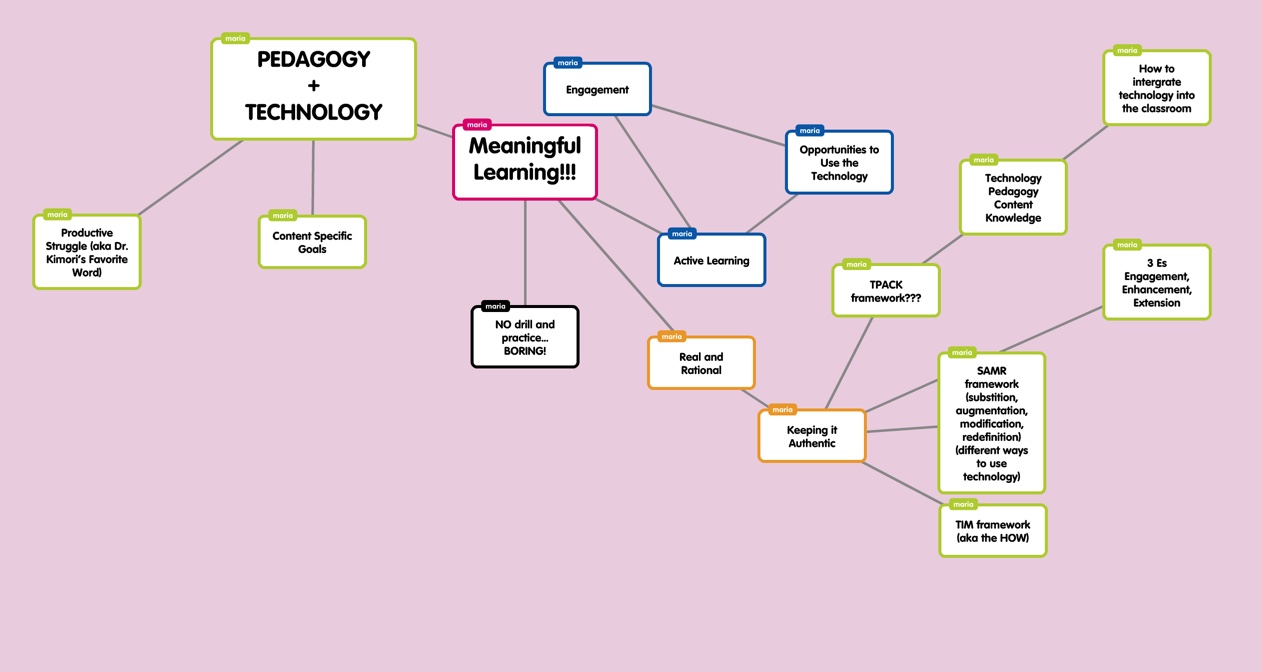
There are different frameworks to use depending on what you feel is best for the classroom and your students.
Different frameworks and an overview of technology in the classroom
There are three different frameworks that can be used. The first is the TPACK framework. The TPACK framework focuses on three main components- content, pedagogy, and technology. First, the educator or instructor would choose a topic that they would like to teach. That would be the content. Second, the educator would choose how to teach it. This should be in response to the learners, meaning, it should be taught in a way that is best for the student. Lastly, the educator would choose which technology best fits both the content and the pedagogy.
The next framework would be the TIM framework. The TIM framework is similar to the TPACK framework, however, the TIM framework focuses in more on the technology. The TIM framework’s main focus is how to use the technology and what the technology being presented is.
The last framework that will be discussed in this post is the SAMR framework. SAMR stands for substitution, augmentation, modification, and redefinition. SAMR uses different forms as technology for typical use. An example would be to use Google Drive instead of Microsoft applications. The students would start to use Google Drive and then realize the benefits and drawbacks of what Google Drive has to offer in comparison to Microsoft.
Taking the First Step
In all, starting a new course of educating is challenging and present new obstacles. However, a lot of materials and good sources are available to those that are willing to take the leap into jumping into the new generation of learning. The bottom line is that learning needs to be more engaging, hands-on, and meaningful, and that can begin with using technology.
For many years, schools have refrained from using technology claiming that it is a distraction or unnecessary to be successful. While those claims still hold true, there are also many benefits to using technology. In this blog, I hope to share with you the benefits of technology in use with pedagogy, or the way one teaches in a classroom. I hope to unhinge some of the preconceived notions and biases out there and bring to light what the facts are. The fact is that when technology is used in the right way, aided and accompanied with the proper pedagogy and specific content goals, it can take a learner far deeper into what is being taught. Learning then becomes extend and more meaningful when the engagement levels are higher. Technology can be the tool to help the educator reach their students and provided them with deeper meanings.








 Technology 4 Future Educators